The New Lightroom Reality: Why Your Old Workflow Is Costing You Time
/If you’ve felt like Lightroom has been getting a bit sluggish lately, you’re not imagining it. With the recent explosion of AI tools like Denoise, Generative Remove, and Lens Blur, Adobe actually updated their recommended order of operations. Most of us were taught to work from the top of the panel down, but the new AI tools have flipped the script. If you apply things in the wrong sequence now, Lightroom often has to "recalculate" or "refresh" your previous work, leading to artifacts or a significant lag. If you aren't doing AI Denoise first and masking last, you're essentially working against the software's engine.
The Secret is in the Sequence
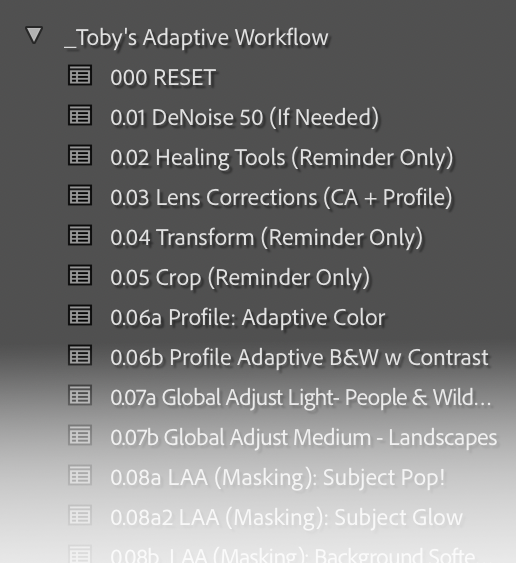
I wanted to create something to help you navigate these changes without the headache. I’ve put together a set of presets that aren't about "magic" styles, but about teaching you the modern roadmap. If you look at the screenshot of these presets, you’ll see they are numbered. This isn't just for organization; it's a step-by-step guide to the way Lightroom wants to work today. We even dive into using the new Adaptive Presets, which act like a significantly improved "Auto Edit" by intelligently targeting the subject and sky specifically for your unique photo.
More Than Just a Preset
The presets themselves are helpful, but the real value is in the learning. I’ve recorded a detailed video walkthroughthat accompanies these presets, where I explain the "why" behind every step.
But it doesn't stop there. When you join the Photo Enthusiast Network (PEN), you get:
The Workflow Video & Presets: Your foundation for better edits.
The Full Library: Instant access to dozens of videos covering every aspect of post-processing.
Weekly Updates: New editing and photography videos released every single week.
An Incredible Community: We have everyone from absolute beginners to seasoned professionals. It is easily one of the most friendly and supportive groups of photographers on the internet.
Join the Community (and get the Presets) for Free
I’m currently offering these presets and the workflow video as a welcome bonus for joining PEN.
If you’re on the fence, come see what the hype is about with a 10-day free trial. You’ll get the presets, the library, and the community access immediately. If it’s not for you, you can cancel at any time—no hard feelings. And if you read this far- Here is a coupon to use for 45% off your first year with us. Use PODCAST at checkout.
I’d love to see you inside and help you finally master a workflow that actually works.


